
Android guide
How to Find Your Android Phone DPI: ADB, Apps, and Specifications
By Editorial Team SensiCalibrator ·
DPI is the density Android uses to size its interface. You can check it with ADB or a device-information app, and estimate physical pixel density from the phone's specifications. Change DPI only to address readability or element size—not for higher FPS, automatic aim, or increased sensitivity. In Free Fire, DPI can affect interface scale and how controls feel, but in-game sensitivity remains a separate setting.
Quick answer
Connect the phone to a computer with Platform-Tools and run adb shell wm density. “Physical density” is the Window Manager's reported base value; “Override density” is an active replacement. Querying the value does not change the phone.
Which DPI do you need to find?
“Phone DPI” can refer to different measurements. Identifying the correct one prevents misleading comparisons.
| Measurement | What it represents | How to find it |
|---|---|---|
| Logical DPI | The density Android uses to convert dp to pixels and scale the interface. | adb shell wm density or a device-information app. |
| PPI or physical density | The approximate number of physical display pixels per inch. | Official specifications or a resolution-and-size calculation. |
| Resolution | The horizontal and vertical pixel count, such as 1080 × 2400. | Settings, specifications, or an app. |
| Smallest width | The smallest available layout dimension, measured in dp. | Developer options on supported phones. |
Logical density does not have to match physical PPI. Manufacturers choose an interface density for the device, and users may apply an override without changing the panel.
How DPI, interface scale, and usable area relate
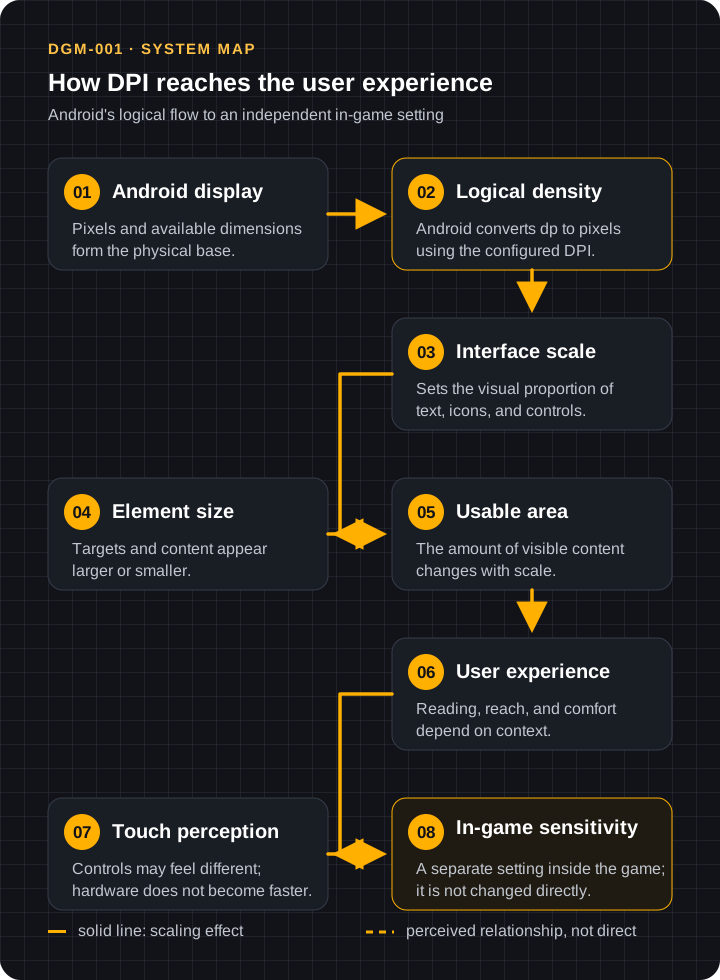
Android combines available resolution with logical density to decide how many pixels represent one dp. That conversion changes the apparent size of text, icons, and touch targets. Smaller elements allow more content on screen; larger elements reduce usable area but may improve reading and reach.
Three ways to find Android DPI
| Method | Best for | Main limitation |
|---|---|---|
| ADB | Checking the Window Manager's base value and active override. | Requires a computer, cable, and USB debugging. |
| App | Quickly viewing logical density and display metrics. | Labels and data sources vary. |
| Specifications | Estimating the panel's physical PPI. | Does not necessarily reveal current logical DPI. |
Settings › Display › Display size can show the current scale position, but usually not a DPI number. “Smallest width” may appear in Developer options; it is measured in dp, not DPI.
How to find DPI using ADB
ADB is Android's official device communication tool. Install Android SDK Platform-Tools, enable Developer options and USB debugging, and authorize only a trusted computer.
- Connect the phone by cable.
- Open a terminal in the Platform-Tools folder.
- Run
adb devicesand confirm the status isdevice. - Run
adb shell wm density. - Record the complete output before any test.
adb devices
adb shell wm density
How to read the result
Physical density: the initial density reported to Window Manager.Override density: the replacement currently in use.- When no override appears, the system uses the base value.
The command's “Physical density” label is not a laboratory measurement of panel PPI. Compare it with official specifications when physical density is what you need.
How to find DPI using apps
Device-information apps may report densityDpi, a density factor, resolution, xdpi, and ydpi. Use them for inspection, not “optimization.”
App safety checklist
- prefer an official app store and an identifiable developer;
- review update recency, privacy policy, and critical reviews;
- deny accessibility, device administrator, VPN, or unrelated permissions;
- do not grant settings-modification access for a read-only task;
- avoid FPS, headshot, accuracy, or “perfect DPI” claims.
If two apps disagree, inspect field names. Logical density, xdpi, ydpi, and calculated PPI are different measurements.
How to find PPI from phone specifications
Official specifications may provide resolution, diagonal size, and sometimes PPI. If PPI is absent, estimate it with:
PPI = √(width² + height²) ÷ diagonal size in inches
Use native resolution in pixels, calculate the diagonal pixel count, and divide by physical screen size. The result estimates panel density; it is not Android's current logical DPI.
Specification limits
- confirm the exact model and regional variant;
- use the active resolution when the phone offers resolution modes;
- treat rounded figures as estimates;
- do not infer interface scale from PPI alone.
What is the relationship between DPI and Free Fire?
DPI belongs to Android; sensitivity belongs to Free Fire. Scaling can change the apparent size of the HUD and its buttons, as well as the perceived relationship between your finger and on-screen elements. It may make controls feel different, but it does not directly increase FPS, touch-sampling rate, physical accuracy, or sensitivity values.
After a change, your finger may need to relearn distances and positions in the HUD. That adaptation is part of muscle memory: keep the layout and sensitivity stable for a few sessions before judging the result. If buttons become too small or require an uncomfortable reach, restore the scale instead of compensating across every in-game control.
Start with in-game controls and read the difference between DPI and sensitivity. If you compare a change, follow a one-variable-at-a-time Training Mode test.
When to change DPI—and when not to
Consider a change when
- text, icons, or buttons are too large or too small for comfortable use;
- the native Display size control solves a real reading or reach problem;
- you recorded the previous state and know how to restore it;
- the change is small, reversible, and tested outside the game too.
Do not change it when
- you only need to find the value;
- you expect higher FPS, performance, sensitivity, accuracy, or faster touch;
- the phone is managed, belongs to an employer, or is not yours;
- you do not have a reliable recovery path;
- the current interface is already comfortable and functional.
Risks, recovery, and limitations
Main risks
An extreme density can make text unreadable, touch targets too small, keyboards uncomfortable, or layouts clipped. USB debugging grants broader access to an authorized computer; disable it after checking and revoke unknown authorizations.
How to restore the original value
- If you used the native control, return to the recorded Display size position.
- If you applied an ADB override, run
adb shell wm density reset. - Restart if the interface does not recover immediately.
- If the original value is lost, do not guess; consult manufacturer support.
Limitations
Names and availability vary by manufacturer, Android version, region, managed profile, and update. Apps can report estimates, and adaptive-resolution displays need additional context. Not every Android phone allows unrestricted density changes.
Frequently Asked Questions
Does DPI improve FPS?
Not directly. FPS depends on processing and graphics workload; logical density mainly controls interface scale.
Does DPI improve aim?
There is no guarantee. Scale can change how the HUD and movement feel, but it does not create physical accuracy or replace practice.
Does DPI increase sensitivity?
It does not change the in-game value. Controls may feel different because element size and usable area change.
Does DPI change touch response?
It does not raise touch-sampling rate or add sensors. It can change target size and perceived finger movement.
Can changing DPI cause a Free Fire ban?
Using a native Android display setting is not the same as modifying the game client. However, Garena prohibits unauthorized programs and tools that interact with Free Fire. Avoid “optimizer” apps, modified clients, and advantage claims, and check the current official policy.
Does DPI change resolution?
Usually not. Logical density changes scale; resolution is the pixel count. Some phones offer a separate resolution control.
Can I return to the original value?
Yes, if you record the previous state. Use the native control or adb shell wm density reset to remove an ADB override.
Can every Android phone change DPI?
No. Controls, limits, and permissions vary by manufacturer, version, region, and device management.
Is smallest width the DPI?
No. It is a layout dimension in dp that relates to density but is not the same number.
Are DPI and PPI the same?
Not here: DPI commonly refers to Android logical density; PPI describes the panel's physical pixel density.
Summary
Find the DPI before changing anything and record the original value. If there is a real readability or reach need, test small, gradual changes while evaluating comfort, legibility, button size, and usability. Then keep the scale stable and adjust in-game sensitivity according to your control and adaptation.
Technical and security sources
Recommended next guides
Choose the next step based on the question you still need to answer.
- DPI on Android and in Free FireUnderstand what scaling changes before considering an adjustment.
- DPI versus sensitivitySeparate the system setting from in-game controls.
- Test in Training ModeCompare one variable at a time with a repeatable process.
- Guide libraryBrowse more technical and configuration resources.
How to validate the value you found
Confirm what is being measured
Before comparing numbers, identify whether the source reports Android's configured logical density, the screen's physical density, or only a commercial specification. These values serve different purposes and do not have to match.
Cross-check the result
Record the exact model, field name, unit, and method. Compare two sources that declare the same concept, such as the relevant system output and an appropriate technical reference. A difference between logical DPI and physical PPI is not automatically a measurement error.
Decision rule
Accept the result when the concept, unit, and model are clear and a compatible second reading supports it. If the methods measure different concepts or require commands you do not understand, do not merge the numbers or modify the phone; restore the original setting whenever a change was involved.